What is Office 365 ?
It's familiar Microsoft Office collaboration and productivity tools delivered through the cloud. Everyone can work together easily with anywhere access to email, web conferencing, documents, and calendars. It includes business-class security and is backed by Microsoft.
From technical point of view “ SharePoint 2010 environment hosted on Microsoft cloud (SaaS) “ . There are lot more thing to know / learn about cloud computing (another post another day ) and there advantage, limitation as of today but this article is aim to discuss about some important consideration and limitation and probably how to overcome that limitation in o365 . Office 365 also provide Microsoft Outlook 2010 , IM and online Meeting service .
Get an Office 365 account first.
There are various plan available on o365 but for learning purpose we can use trial account. Remember o365 allow one public facing web site and multiple private site collection per account . Public website has read only anonymous access by default and authenticated user will get access also. Private site collection doesn’t have anonymous access but FBA. Generally format of the user will be <username>@<companyname>.onmicrosoft.com (We can synchronized our AD with o365 ) .
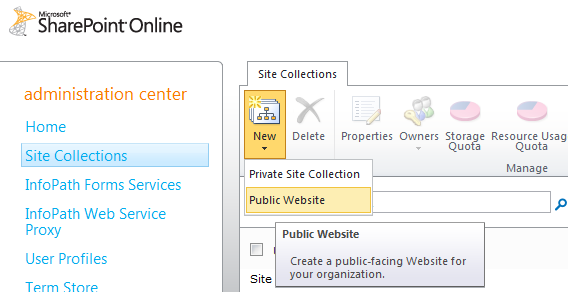
If you go to tenant administration (located at https://yourname-admin.sharepoint.com) and go to the Site Collections page, there is a new option under the New button in the ribbon. Create public / private site .


I’m not sure if this is a bug or by design. However, you can still get to the Site Settings page by going to /_layouts/settings.aspx. Here, you can get to the solutions gallery, master pages, features, etc.. You should be able to brand the site just like you would any other SharePoint site using SharePoint Designer and / or sandboxed solutions with Visual Studio 2010.


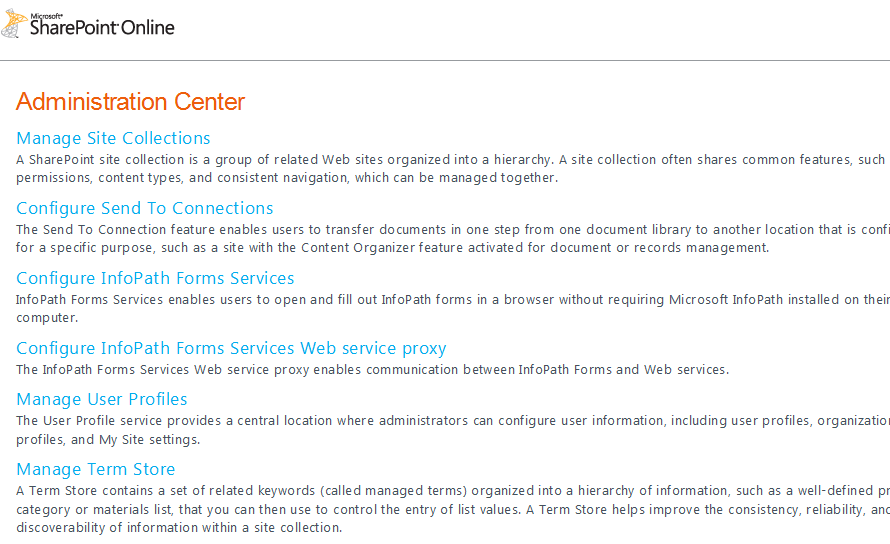
Speaking of Central Administration. It doesn’t really exist. There is an administration site accessible at https://yourname-admin.sharepoint.com but you won’t see the central admin site you know. It’s a limited tenant-type administration page. Currently, you can only configure site collections, send to connections, InfoPath Form Services, User Profile Service Application, and the Managed Metadata Term Store. Clicking on any of the links will bring you to familiar screens to manage those components.


In order to create new site ( sub site) follow the below steps which is same as on premises SharePoint


Some important facts and limitation of o365.
Developer should be very comfortable with SharePoint designer 2010 , XSLT , ECMA script in order to branding and customization on o365 .
Only sandbox solution can deployed in o365 . So no visual web part , user control , application page and so on . Remember this is a multi tenant environment so no access on physical server and central admin.
Variation is not supported on o365 ( So how to develop multilingual site ?)
RSS viewer web part is not working ( So how to consume RSS feed date in site ? )
Anonymous user can have read only access only ( So how user will update a list like adding comments on blog or ‘Contact us’ functionality ? )
Document cannot be open in browser . It has to be download first . Separate ticket has been raised to Microsoft for this . For the time being we can use Google Doc to open document in browser .
For example, if you wanted to view the PDF at the URL http://labs.google.com/papers/bigtable-osdi06.pdf you would use the URL: http://docs.google.com/viewer?url=http%3A%2F%2Flabs.google.com%2Fpapers%2Fbigtable-osdi06.pdf
Working with Master page in o365 .
I think it is SharePoint designer is much better option than Visual Studio when we will be working with Master page for o365 . In visual studio based master page all images , css and js we generally try to deploy in 14 hive folder but in o365 as we don’t have access to server so can’t do that here, we have to keep all this files in a document library inside o365 environment .
<SharePoint:CssRegistration name="<% $SPUrl:~SiteCollection/Style Library/en-US/Core Styles/custom.css %>" After="corev4.css" runat="server"/>
<script src="/Style%20Library/en-US/JSLib/jquery.js" type="text/javascript"></script>
Develop multilingual site in o365.
As we discussed above that variation s not supported (as of today ) by o365 so there is no direct way but what we can do is ,if we are developing public facing site then we can create a sub site for each language .Like for English and Arabic we will create two sub site and in master page we can have redirection link for each language . Yes , you got it , in this approach we have create same page twice with translated contain . So not truly multilingual but definitely some solution. Remember o365 user interface support multilingual so , we have to enable the languages against the site and we will get all operational menu / ribbon in selected languages .

Consume RSS feed date in site .
People have come up with 365 RSS web part . See this below link .
But its not easy to change the look and fill of this web part . So what I did is create a REST ( using external RSS feed url )connection using SharePoint designer 2010 and add a XSLT list view web part using SharePoint designer . Now you can change XSLT to get the customized look . Date source of the REST connection will be the RSS URL .
Contact us :
As anonymous user don’t have read write access so user cannot update list or library . So in public web site if you want a functionality like submit query by user (anonymous access) and store it in a list , it cannot be possible in o365 . But we can send mail to on user request submission to predefine email address . Below web part code will do this but we have to create a page layout with this web part and then create a page using that page layout .
<WebPartPages:spproxywebpartmanager runat="server" id="spproxywebpartmanager"></WebPartPages:spproxywebpartmanager>
<iws:ContactUsControl runat="server" EmailTo="upal@xyz.com" CultureName="en-US" SendToBCM="on" xmlns:iws="iws" />
PowerShell Script for o365 :
General PowerShell command will not work 036 . We need help of power shell to perform some activity (like changing domain name etc ) . Below like will help us to come up with power shell command .
Conclusion :


No comments:
Post a Comment